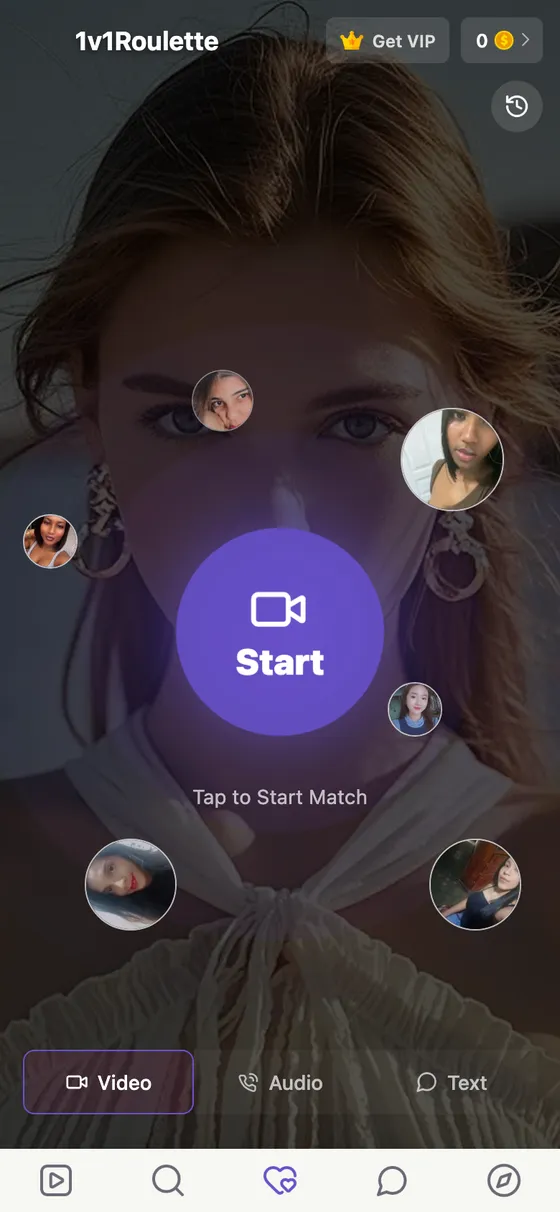
What happens when you press Start
Opening 1v1Roulette takes you to a single screen with one large Start button in the middle. There is no form to fill in and no profile to build first: the site sets up a lightweight account in the background, so your trial time and coins have somewhere to live.
Press Start and your browser asks once for the camera and microphone. From there you are in the matching queue. When someone is found, the conversation opens as a one-on-one call: two people, no group room, no audience. The top of the screen shows your coin balance and a VIP option; neither is needed to press Start.
Video, audio or text: three ways to match
Under the Start button are three tabs. Video is the default: a face-to-face 1v1 video chat. Audio matches you for a voice-only call, useful when you would rather not be on camera yet. Text matches you into a typed conversation.
The idea is the same in all three: one person at a time, and the choice to move on. Pick the tab before you press Start.
How chat roulette matching works here
Chat roulette means you do not choose from a list first; you get the next introduction and decide whether to stay. On 1v1Roulette that matching works from whoever is available at that moment, so how long you wait and who you meet vary with the hour.
Before a video match connects, you may see a short preview of who you are about to meet, with the option to skip and find another. Once you are connected, it is a normal call. A match is never guaranteed instantly, and nothing on this site pretends otherwise.
Next, Leave and Report during a 1v1 video call
- Next ends the current conversation and goes back to matching. No reason or goodbye is needed.
- Leave ends the session entirely, not just the person on the other side.
- Report sends the conversation to a person for review. It is kept apart from Next so it is never pressed by accident. An account removed for breaking the community guidelines cannot register again.
- Block stops someone from reaching you again, permanently.
The person on the other side has exactly the same controls. More on how reports are handled is on the safety page.
Matching, or calling someone directly
Roulette-style matching is the heart of 1v1Roulette, but it is not the only way in. You can also browse profiles of people who are online and start a 1v1 video call with someone you choose, or message them first. Matching is for the surprise; a direct call is for when you already know who you want to talk to. See 1v1 video calls with girls for how that side works.
What a 1v1 video call costs
Calls are paid, and these are the rules, without small print:
- Trial time. A new account starts with some free trial time, but the amount is set by an anti-abuse system, so nobody can promise you a fixed number of free minutes.
- Coins. After the trial, calls run on coins you buy up front and that are drawn down as you talk.
- No single rate. Each person sets their own price per minute, so two calls of the same length can cost different amounts.
- A warning first. A notice appears before billing starts, so the change from trial to paid is never silent.
- Extras. Coins can also go on gifts; VIP is optional.
Spent coins are not refundable except where the law requires it; the details are in the Terms of Service.
Camera and microphone permissions
The browser asks for the camera and microphone when you start, never just because you opened the page. Allow both for a video match; the Audio tab only needs the microphone. Calls are not recorded.
If nothing happens, the permission was probably blocked. Open your browser's site settings for 1v1roulette.com, allow the camera and microphone, and reload. Closing other apps that use the camera helps too. The Help Center covers the other common cases.
On a phone or a computer
1v1Roulette runs in the browser you already have, on a phone or a computer, with nothing to download. The layout keeps the person you are talking to in focus and the controls within reach of your thumb. On a phone you can also add 1v1Roulette to your home screen so it opens like an app. A steady connection matters more than the device: Wi-Fi or a strong mobile signal works best for a 1v1 video chat.